Sharing your website posts on facebook can drive more traffic. You should therefore optimise your photos that will appear on your share post.
So here is our tip:
Use images that are at least 1200x630px for the best display on high resolution devices. You should use images that are 600x315px at the minimum to display link page posts with larger images.
If your image is smaller than 600x315px, it will still display in the link page post, but the size will be much smaller.
You should also have an aspect ratio as close to 1.91:1 as possible to display the full image in News Feed without any cropping.
source:
https://www.facebook.com/PagesSizesDimensions
http://goo.gl/oCUkyd

Friday, July 22, 2016


Facebook timeline Images Best Practices
One of your most frequent questions is about the optimum dimensions of an image in timeline.
Well, when you post an image you have to think that there are two primary locations that your image will appear.
Why to do so:
4:3 is close to the 472:394 ratio and is more common.
On the other hand 504px minimum width will keep you covered for the blanks on the sides.
Finally from Facebook we get the following:
In addition to the page timeline and the fan’s newsfeed, photos will also appear in the photo stream. Finally let’s not forget that Facebook also allows photos to be posted in comments.
In all of these locations, if a photo is clicked, the photo will open in full-screen mode.
source:
https://www.facebook.com/PagesSizesDimensions
https://www.facebook.com/help/www/266520536764594
Well, when you post an image you have to think that there are two primary locations that your image will appear.
- In your timeline where the minimum for displaying right is 504x504px (http://goo.gl/3bf6kI).
- In your fan’s newsfeed, where it should be at least 472x394px ( http://goo.gl/19XH99 ).
Use 4:3 ratio or more landscape images with a minimum 504px width.
You should also try to stick in one the following widths if you want to avoid compression:
Keep in mind that a photo should be less than 100 KB to avoid compression and cannot be more than 25 MB.
- 720 px
- 960 px
- 2048 px
Save your image as a JPEG with an sRGB color profile.
Why to do so:
4:3 is close to the 472:394 ratio and is more common.
On the other hand 504px minimum width will keep you covered for the blanks on the sides.
Finally from Facebook we get the following:
Resize your photo before you post it.Some extra info:
These are the sizes (width) we support:
Regular photos 720 px, 960 px, 2048 px
If you use a 2048 px photo, make sure to select the High Quality option when you upload it.
Save your image as a JPEG with an sRGB color profile.
In addition to the page timeline and the fan’s newsfeed, photos will also appear in the photo stream. Finally let’s not forget that Facebook also allows photos to be posted in comments.
In all of these locations, if a photo is clicked, the photo will open in full-screen mode.
source:
https://www.facebook.com/PagesSizesDimensions
https://www.facebook.com/help/www/266520536764594
Monday, August 11, 2014
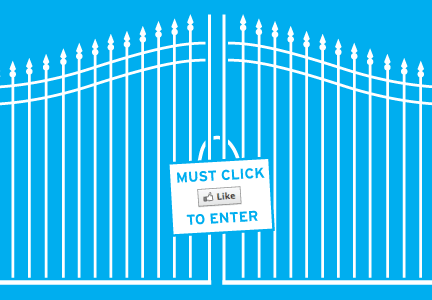
Facebook Like gate is no more
Finally, Facebook wants you to really like a page in order to press the button like..

According to developers.facebook.com:
According to developers.facebook.com:
The liked field will no longer be returned in the page property of the signed_request object for Page Tab apps created from today onwards. For apps created before today, from November 5, 2014 (90 days from today), the liked property will always return true regardless of whether or not the person has liked the page.
What does this mean
This means that when you use a custom page app, for example a contest or a sweepstake you can't anymore force your audience to like your page prior to use your app.
This is actually a good thing. "Like hunting" was never good for a business. Facebook now wants Pages to collect more genuine fans, and not those who became fans for a random sweepstakes prize.
Here is what they say:
You must not incentivize people to use social plugins or to like a Page. This includes offering rewards, or gating apps or app content based on whether or not a person has liked a Page. It remains acceptable to incentivize people to login to your app, check-in at a place or enter a promotion on your app’s Page.
and they continue:
To ensure quality connections and help businesses reach the people who matter to them, we want people to like Pages because they want to connect and hear from the business, not because of artificial incentives. We believe this update will benefit people and advertisers alike.
So now what?
As we said, this new update to remove the “Like Gate” is a great move by Facebook. Businesses will now be able to attract more quality fans using Facebook apps instead of attracting those who only like for the incentive. Of course you can still ask people to like your Page through an app, like “Please like us to receive updates!”
Friday, July 25, 2014
Get viral with Pinterest "Rich Pins"
What are Rich Pins?
Rich Pins are Pins that include extra information right on the Pin itself.There are five types of Rich Pins:
- movie,
- recipe,
- article,
- product and
- place
but according to pinterest there are more to come.
Lets take a look one by one
Place Pins
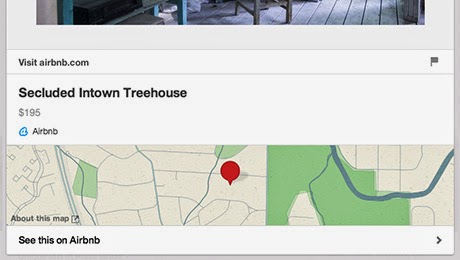
Place Pins include
- A map,
- Address, and
- Phone number.
Make your own place board
Creating a board of Place Pins is easy. Just select Add a map when you create a new board or Edit an existing board’s settings to Add a map. After that, you can map all of your new and existing Pins on the board to help plan your next adventure.
Create boards with friends
Collaborate on a group board and plan ideas for weekend activities around town. Have a friend who’s going somewhere you’ve visited before? You can now send a board with your favorite restaurants and must-see sights.
Article Pins

Article Pins include
- Story headline,
- Author Name,
- A Description of the Story (like your meta description) and
- Source URL
Pinterest will also retroactively adjust the look and feel of articles you've pinned in the past, so your old stuff will get the new, sexy look.
Product Pins

Now that makes it easy for people to buy your stuff. Product Pins include
- Real time pricing,
- Availability and
- Where to buy.
Hint: Shopify now supports Product pins.
Recipe Pins

Recipe Pins include
- ingredients,
- cooking times and
- serving info
Movie Pins

Movie Pins include
- Ratings,
- Cast members and
- Reviews
How to use all this stuff
 To get started, you'll need to prep your website with meta tags, test out your Rich Pins and apply to get them on Pinterest.
In fact Pinterst supports two collection methods: oEmbed and semantic markup (Schema.org and Open Graph). We really suggest Schema.org method. If you're not technical, you might want to ask your developer or site owner to help get you going!
Thursday, July 10, 2014
Pinterest: Introducing a new Follow button

What's new about the new follow Button
The new Follow button will pop up a small dialog with a preview of your account’s latest Pins — and your visitors won’t ever have to leave your website to follow you. Once someone follows your account, they’ll start seeing your Pins in their home feed.How Can you get the new follow button
It’s easy to add this button to your site. It’s just a couple of lines of code, which you can copy and paste onto your pages in a matter of minutes.You can get the new Follow button on pinterest widget builder.
I Have already the pinterest button on my website
If you have the original Follow button in place, you won’t have to do anything to get the new version—it’ll just work!Wednesday, June 4, 2014
Facebook: 30M small business pages, 19M manage via mobile.
Facebook for business announced today that 30 million small business Pages have a business page on their platform worldwide.

Additionally nearly two-thirds of these business owners –19 million– are actively managing their Pages via mobile. this is a testament to the growing importance of a mobile marketing presence.
To Celebrate we made a new upgrade on the New Cover image that you can find it here. You can also download it here as psd.
Find more about us on yoconta.com.
Additionally nearly two-thirds of these business owners –19 million– are actively managing their Pages via mobile. this is a testament to the growing importance of a mobile marketing presence.
To Celebrate we made a new upgrade on the New Cover image that you can find it here. You can also download it here as psd.
Find more about us on yoconta.com.
Thursday, May 1, 2014
facebook f8 2014

This time we have news from facebook that are amazing for all.
Anonymous logins
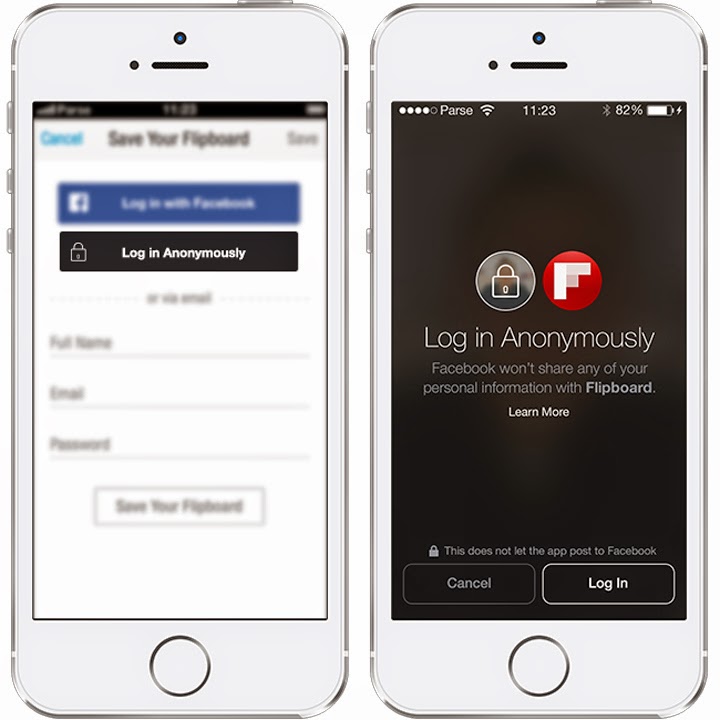
Facebook says it will let users log in to apps anonymously, without sharing their identities and personal information with mobile applications they don’t trust.
Facebook’s users can already use a “log in with Facebook” button to sign up for apps that let them listen to music, play games, read the news and monitor fitness activities. But using the button allows apps to access information related to the Facebook user’s identity.
With the anonymous login, which is black instead of Facebook's iconic blue, lets members easily log in to applications without a username or password, but without the sometimes unnerving commitment of handing over personal Facebook data to an untrusted source.
Is this good or bad for apps
We agree with Zuckerberg. He said that this way facebook users will have the chance to use more apps and developers on the other hand will have to build a trust with those users.
Facebook's Audience Network

This is BIG news.
The new "Audience Network" will let marketers push their Facebook ads off the social network and into apps who sign up to participate in the network. Advertisers can choose to run banner, interstitial, or native ads off Facebook to encourage app installs and other activities, and they can take advantage of Facebook's usual targeting and measurement tools.
Tuesday, March 11, 2014
Facebook revamps Pages
Facebook revamps Pages on the desktop with new one-column Timeline design to match user profiles.


This week, we’ll begin rolling out a streamlined look for Pages on desktop that will make it easier for people to find the information they want and help Page admins find the tools they use most. Here are the key features of the update:
You’ll notice that the left-side column includes all the information about the Page, including a map, possible hours of business, phone number, website URL, as well as photos and videos. This is further confirmation by Facebook that the previous multiple-column design was simply too confusing; the company has decided to put all posts on the right side and all other information on the left.
Saturday, March 8, 2014
Facebook creates a better Way to Organize Your Ads

Facebook just made simpler the way it organize its ad structure so now there are three levels of organization: campaigns, ad sets and ads.
Let see the new structure
Campaigns
It's now easier to organize your campaigns around objectives to get better optimization and reporting on your ads.Ad Sets (new)
You can have multiple ad sets in a campaign, each with its own budget and schedule. Create ad sets for each audience to optimize your ads for each one and measure their response.Ads
Ads will still work the same as before, with controls for targeting, creative and placement.What about existing campaigns?
- Your ads have not changed.
This migration will not affect your ad performance, and all your historical data is still available. - Each campaign has one ad set.
The ad set contains the original budget, schedule and status of your campaign.
Conclusion
By adding an extra level, facebook makes campaign handling easier if you want to use different audiences, make split tests and compare your campaign results.
If you have a simple campaign you can use one ad set per campaign.
Thursday, March 6, 2014
Wow! Free Getty images!
The world's largest photo service just made its pictures free to use.
If you go to the Getty Images website, you'll see millions of images, all watermarked. There are more than a hundred years of photography here, from FDR on the campaign trail to last Sunday's Oscars, all stamped with the same transparent square placard reminding you that you don't own the rights. If you want Getty to take off the watermark, you'll have to pay for it.


If you go to the Getty Images website, you'll see millions of images, all watermarked. There are more than a hundred years of photography here, from FDR on the campaign trail to last Sunday's Oscars, all stamped with the same transparent square placard reminding you that you don't own the rights. If you want Getty to take off the watermark, you'll have to pay for it.
What is changing
Starting now, that's going to change. Getty Images is dropping the watermark for the bulk of its collection, in exchange for an open-embed program that will let users drop in any image they want, as long as the service gets to append a footer at the bottom of the picture with a credit and link to the licensing page.Why this change occured
According to Craig Peters, a business development exec at Getty Images, "if you want to get a Getty image today, you can find it without a watermark very simply,". "The way you do that is you go to one of our customer sites and you right-click. Or you go to Google Image search or Bing Image Search and you get it there. And that's what's happening… Our content was everywhere already."
Why is that great
Now if you have a small business and you want some stock image to use, you can do it easily by embedding one from http://www.gettyimages.com. It's easy.
How to use it
Just click on the photo you want and get the embed code.
It's easy!
Wednesday, February 26, 2014
Facebook buys WatchApp

Facebook acquired WhatsApp for $19 billion!!!
This is the biggest deal for Facebook ever. The previous Biggest deal for Facebook was Instagram, which it bought for about $1 billion in 2012. In addition to that Viber’s was acquired by Japanese company Rakuten for $900 million and of course Skype was acquired by Microsoft for $8.5 billion.Lets see what was the deal exactly:
Facebook will acquire WhatsApp for approximately $16 billion, consisting of $4 billion in cash plus 184 million shares or approximately $12 billion worth of WhatsApp’s stock. Also, Facebook will grant 46 million RSUs worth approximately $3 billion to WhatsApp employees that will vest over four years subsequent to closing. The stock and RSUs to be issued will represent 7.9% of Facebook’s shares based on current shares and RSUs outstanding. The transaction is subject to regulatory approvals, and Facebook expects the deal to close later in 2014. Note that if the deal doesn’t go through, Facebook will still be required to pay $2 billion to WhatsApp under a termination clause.What does this mean for the average user?
According to WhatsApp CEO Jan Koum nothing.
“It was important for us to build a product not cluttered by gimmicks or promotions and be part of mission to build something to connect people. It is because of those values today we have 465 million monthly active users. Almost one third of a billion people use our product today to stay in touch. We promise not to change and to continue to build what is important to us – using the philosophy of using a product to help people connect,”
What is next for WhatsApp
According to Jan over the next months (until June) the app will add voice calls feature. The announcement was made in the MWC 2014. That is quite a big change so all the big players in www have now a telecommunication company on their portfolio
- Google - Hangouts
- Facebook - WhatsApp
- Microsoft - Skype
Saturday, December 7, 2013
Facebook for Business expands Globally
Facebook for business announced that expands in in 11 more languages — Brazilian Portuguese, European Spanish, French, German, Italian, Japanese, Korean, Latin American Spanish, Simplified Chinese, Traditional Chinese and UK English.
This is the exact announce in their blog:
Following the North American launch of Facebook for Business earlier this year, we’re today launching Facebook for Business in 11 more languages — Brazilian Portuguese, European Spanish, French, German, Italian, Japanese, Korean, Latin American Spanish, Simplified Chinese, Traditional Chinese and UK English.
These local-language versions of Facebook for Business are designed to help provide the most relevant content to advertisers around the world. In addition to product information, tips for advertising on Facebook and success stories, the international Facebook for Business sites will soon feature new, localized content serving marketers’ needs on a regional basis.

Friday, November 22, 2013
Facebook Ad Audiences
Facebook introduces the Ad Audiences, a new feature to engage your offline audience with your Facebook fun page.

Offline Audience

Offline Audience is your audience that is not necessarily liking your page and was gathered with means, other than facebook e.g. mailchimp, coupons, hard copy forms etc.
Facebook can relate this audience if you upload those data that could contain
- Emails
- Facebook user ids
- Phone numbers
- Mobile advertiser ids
You can create as many audiences as you like here: https://www.facebook.com/ads/manage/audiences.php
Whats next?
You can use your custom audiences in every ad you make or you can create an audience while creating a new ad. You can use custom audiences to include or even exclude this audience for your campaign.
Tips
Create many different audiences that are meaningful to you. There is no limit of how many audiences you can create. Your Custom Audiences should have at least 1000 people to help ensure meaningful reach with your ads.
Pinterest teams up with foursquare and openstreetmap
Pinterest teams up with Foursquare and Openstreet map to introduce "Place Pins".
Now you you can add a map option to your board so you can place your pin on the map provided by openstreetmap and vice versa. You can easily and foursquare photos related to your business to one of your boards.
If you click on a geolocated pins, this, will reveal the foursquare related business alongside with a link to take you to the corresponding business on foursquare.
This is great because you can create place related boards for your business.

Now you you can add a map option to your board so you can place your pin on the map provided by openstreetmap and vice versa. You can easily and foursquare photos related to your business to one of your boards.
If you click on a geolocated pins, this, will reveal the foursquare related business alongside with a link to take you to the corresponding business on foursquare.
This is great because you can create place related boards for your business.
How can you do that
Creating a board of Place Pins is simple.
Just toggle “Add a map” when you create a new board or edit an existing board’s settings. After that, you can map all of your new and existing Pins to the board.
You can undo this action by editing your board and switch off "Add a map" option.
Beware if have already added a map in a pin this will stay as is.

Thursday, November 7, 2013
Facebook Redesigns The 'Like' Button
Facebook redesigns the Like Button for the first time since its introduction in 2010.


and had a thumbs up icon that is dropped in the new 2013 version.

Using the "Like" button will instantly post the content to Facebook, while "Share" button will allow you to add a comment to the content or place it in a more specific place, such as a group page you manage or in a private message.
What are the changes
- The new like button is more blue than the old like button.
- It drops the thumbs up icon.
- There is also a new version of share button.
- Both buttons are retina ready, so there gonna be awesome on retina displays.
- There is now a new version of like alongside with share, so you can save effort and space when you want to use both of them.
What do you have to do in order to get the new button?
- Nothing. If you are currently using the old Like button, you'll be automatically upgraded to the new design as part of Facebook roll out.
- Still, you can use the new Like+Share buttons in your new or existing implementations.

The old like button
This button was introduced in back in 2010and had a thumbs up icon that is dropped in the new 2013 version.
Some numbers:
- The Like and Share buttons are viewed over 22 billion times daily across more than 7.5 million websites.
- Like and Share are important drivers of Facebook referral traffic, which is larger than all other social networks combined according to a recent Shareaholic report.

Friday, July 26, 2013
Facebook for Business

Read more here
https://www.facebook.com/business/news/Facebook-For-Business
Friday, March 23, 2012
Facebook Pages Cheat Sheet
Building a fun page for your business in Facebook is great.
We made a demo page to list all of the sizing information for images and help you build your own page the right way.
What is great about this page is that once you like it, you'll be notify when Facebook implements a new sizing change. Just don't forget to mark get notification after liking this Facebook page.

We made a demo page to list all of the sizing information for images and help you build your own page the right way.
What is great about this page is that once you like it, you'll be notify when Facebook implements a new sizing change. Just don't forget to mark get notification after liking this Facebook page.
Subscribe to:
Posts (Atom)